You’re rebranding and want to ensure internal teams are aligned on term usage and meaning before they reach users. Or you’re creating a CRM and want to build a robust tagging system. Maybe you’re hoping to increase the time website visitors spend on the site (and likelihood to purchase) by serving them more relevant content based on their goals.
These are some scenarios where teams will look to taxonomies, also known as glossaries, controlled vocabularies, and structured categorization systems. In its purest form, a taxonomy is a list of terms related to a product.
Goals of building a taxonomy
I’ve supported over 30 companies in creating flexible information architecture that can flex to accommodate hundreds of taxonomy terms. I always start by identifying the goals of the information architecture redesign or taxonomy build. Some common taxonomy goals I hear include:
- Standardize terms used in a platform
- Offer a consistent experience to users
- Serve more relevant content to users based on their goals
- Reduce the time it takes to design new features/pages
- Reduce cognitive load for users and employees
- Improve AI/machine retrieval accuracy
- Improve onboarding for newcomers
- Reduce communication gaps within the group
Where to start with building a taxonomy
I’ve written a guide about the dos and don’ts of building a business glossary, but for a quick recap, here’s where to start.
- Start with an unstructured brain dump. Get as many terms on paper as possible. Don’t worry about their meaning or usage frequency at this stage.
- Review your latest communications in Slack and email. Have you used any acronyms or terms that you’re not 100% sure make sense to people outside your immediate team? Write them down.
- Identify your most frequently used documents. If you’re in sales, those might be pitch decks, proposals, and outreach templates. Read through them carefully, or better yet, hand them over to someone in another field and ask them to highlight acronyms and unclear terms.
- Create small groups with team members from other disciplines, where everyone has to explain their duties and an example of a day in their life, and others note mentions of acronyms or terms they didn’t quite understand.
How to structure the taxonomy spreadsheet
A taxonomy build follows the process mentioned above and often culminates in the creation of a big spreadsheet in Airtable, Google Sheets, or dedicated tools like Docusaurus and Dataedo.
I can’t share client examples because they’re confidential information, but I’d still like to give you a solid starting point for structuring your taxonomy spreadsheet.
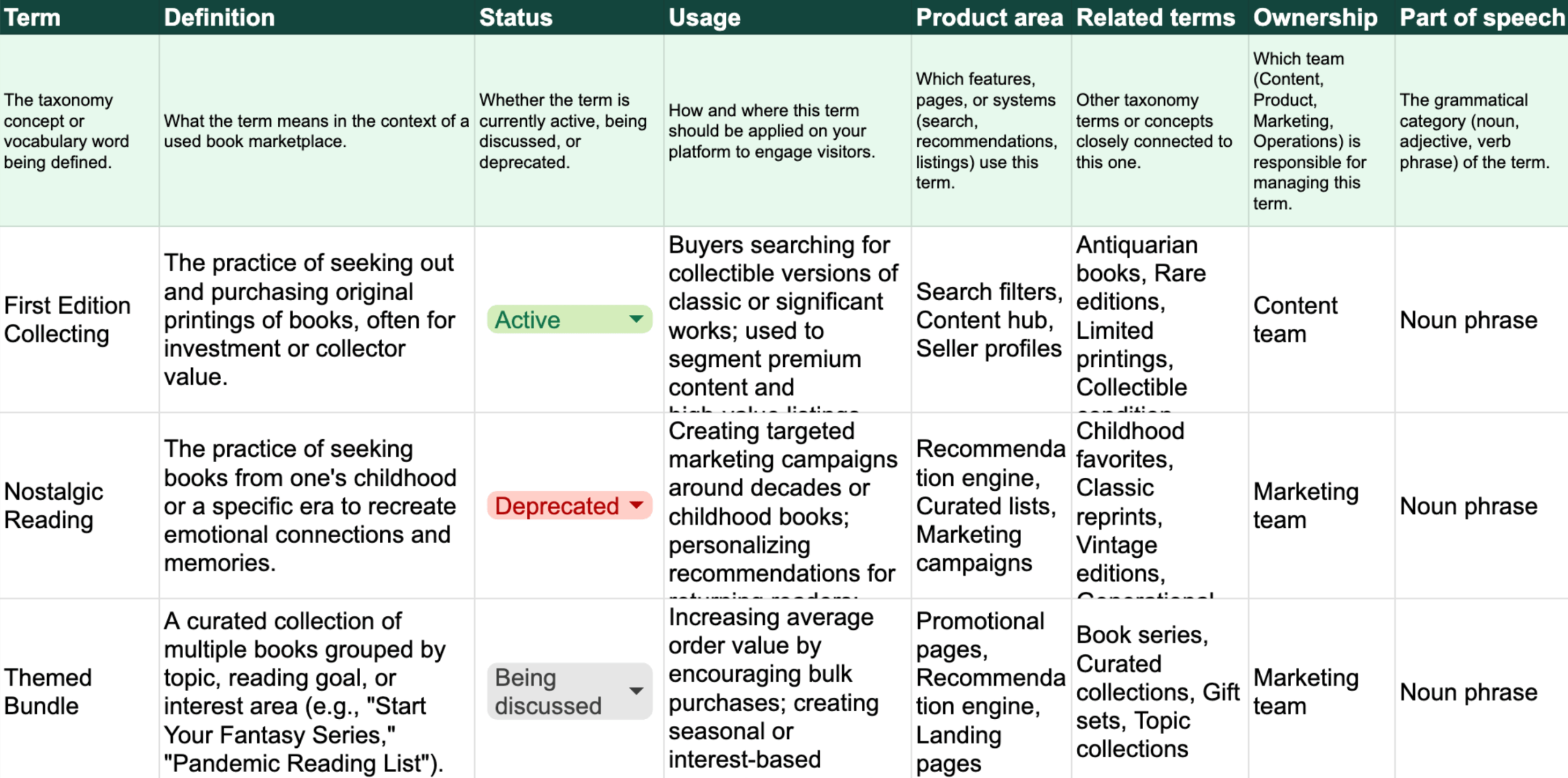
In the example spreadsheet below, I’ve created a taxonomy for a website that connects sellers and buyers of used books. The goal of the taxonomy is to increase the time website visitors spend on the site and the likelihood of purchasing by serving them more relevant books based on their reading preferences regarding genres, length, authors, and book prices. The spreadsheet includes example terms and columns for:
- Term – The taxonomy concept or vocabulary word being defined
- Definition – What the term means in the context of a used book marketplace
- Status – Whether the term is currently active, being discussed, or deprecated
- Usage – How and where this term should be applied on your platform to engage visitors
- Product area – Which features, pages, or systems (search, recommendations, listings) use this term
- Related terms – Other taxonomy terms or concepts closely connected to this one
- Ownership – Which team (Content, Product, Marketing, Operations) is responsible for managing this term
- Part of speech – The grammatical category (noun, adjective, verb phrase) of the term
Used book marketplace taxonomy spreadsheet example
You can review the taxonomy spreadsheet below and make a copy in Google Sheets.
Each term represents a key concept that can drive visitor engagement and conversion. A visitor searching for “First Edition Collecting” should see premium listings and expert seller profiles, while someone interested in “Themed Bundles” should see curated collections and bulk-purchase promotions.
Part of speech–the grammatical category (noun, adjective, verb phrase) of the term–may sound obvious. However, some commonly used technical terms serve as both nouns and verbs. For big design teams constantly launching and iterating features, you’ll want to standardize when and how terms are used, while not getting them mixed up. Examples of terms that match different parts of speech (nouns and verbs) include access, sync, design, launch, update, search, link, and message.
Adapt your taxonomy to company goals
Depending on what your goals are with this taxonomy build, you can:
- Group labels into hierarchies, i.e., listing all book genres as child items under a parent Book Genre term
- Include business metrics, i.e., current time on page and conversion rate, expected business impact, and weekly/monthly/quarterly reports to quantify the actual impact
- Adjust the focus for specific visitor segments, i.e., developing a taxonomy specifically for collectors
- Adjust the focus for business unit, i.e., having separate spreadsheets for the Sellers team and the Buyers team, separate for customer service
- Include references/links to localized terms and processes
- Expand on governance, i.e., instead of a single Ownership column, specifying which people from which teams are responsible and accountable for the terms, who needs to be informed, and status columns for new terms
- Automate weekly roundups of taxonomy work, i.e., Slack updates on any new terms introduced, defined, or deprecated from the platform (based on status), tracked business metrics, user research being done for term resonance (pulled from tickets linked in the sheet)
Whether your company wants to ensure internal alignment for your multi-site rebrand, build a robust CRM, or improve conversions through content personalization, building a taxonomy can support those goals through added clarity and consistency.
I’d love to hear where you’re at in your taxonomy journey. If you’re interested in this area, download my new ebook, Accessible IA Fundamentals – A Beginner’s Guide to Intuitive Information Architecture.
AI Policy: I personally write each draft and final copy on this website. All content reflects my own thinking, ideas, style, and craft. I do not use AI such as ChatGPT to generate articles. Occasionally, I ask AI such as Formalizer or Claude to summarize or restate my own ideas and may restructure sections based on the response.
The spreadsheet entries were generated based on a prompt I gave to Claude’s Haiku 4.5 AI model, which included instructions on the purpose and desired structure of the spreadsheet (Term, Definition, Status, Usage, etc.) for a used book marketplace taxonomy.